



TL;DR: Most coaching institutes in India are running their admissions pipeline across three to five disconnected tools — and losing 30–40% of viable leads between stages as a result. This guide covers what a proper admissions pipeline looks like, where the industry's most-used CRMs create structural blind spots, and how Erino gives admissions heads the stage-level visibility that converts enquiries into enrollments. If your team has tried LeadSquared, Zoho, or a similar platform and still can't tell you exactly where leads are dropping — this is the article to read.
What Is Admissions Pipeline Management — and Why the Definition Has Changed
Five years ago, "admissions pipeline" meant a spreadsheet with columns for name, phone, course, and status. If your counselor updated it once a day, you were considered organized.
That definition no longer holds. Indian EdTech has scaled past the point where manual visibility is operationally sufficient. The institutes winning enrollment share in 2026 are not the ones with the best faculty or the lowest fees — they are the ones with the sharpest operational systems. They know, in real time, how many leads are in each stage, exactly where the funnel is losing volume, and which counselors are driving conversion versus which ones are creating pipeline stagnation.
Admissions pipeline management, defined precisely: the structured process of tracking every student enquiry through defined, measurable stages — from first contact to fee payment — with stage-level conversion data, follow-up enforcement, and manager visibility at each transition point.
That last part is what most coaching institutes are missing. The stages exist. The data doesn't.
The Real Problem Is Not That You Don't Have a CRM
If you've been in EdTech ops for more than two years, you have probably already run one of the following: LeadSquared, Zoho CRM, Freshsales, a customised HubSpot setup, or at the very least a shared Google Sheet that someone called a CRM.
And you still have the same problem.
Leads come in from Meta, from portals, from walkins, from referrals. They get distributed to counselors — either automatically or via a morning WhatsApp from the ops manager. Some get called. Some get counseled. Some pay fees. Most go silent somewhere in between, and nobody can tell you exactly where or why.
This is not a failure of effort. It is a failure of pipeline architecture. The tools most teams use were not built to surface the questions that actually matter to an admissions head:
- At which specific stage are we losing the most volume?
- Which counselors are converting demo-attended leads at above-average rates — and which are not?
- How long does the average lead spend in "Fee Discussion" before it either converts or drops?
- Which lead sources are producing enquiries that reach enrollment — not just enquiries that answer the first call?
These are not exotic analytics requests. They are the operational baseline for running an admissions team at any serious scale. The fact that most CRM implementations can't answer them without a custom report is not the user's fault — it is a product design failure.
The 6 Stages of a High-Performance Coaching Institute Admissions Pipeline
Before fixing the pipeline, you need to define it precisely. Here are the six stages that reflect how top-performing Indian coaching institutes actually structure their admissions funnel — with conversion benchmarks based on what high-performing teams achieve versus industry average.
→ Stage 1: New Enquiry
- Definition: Lead has entered the system from any source — Meta Lead Ad, portal, walk-in, referral, website form, or cold outreach. No contact attempt has been made yet.
- What happens here: Lead capture, automatic deduplication, source tagging, and counselor assignment. The clock starts the moment this stage begins.
- Critical metric: Time from enquiry entry to first contact attempt.
- Benchmark: Top-performing institutes make first contact within 5 minutes for 80%+ of leads. Industry average is 45–90 minutes. The conversion impact of this gap is not marginal — leads contacted within 5 minutes are between 8x and 9x more likely to convert to a first connected call than leads contacted after an hour.
- Where teams fail: Assignment delays. Leads sit in a queue waiting for manual distribution. By the time a counselor calls, the student has already spoken to a competitor.
→ Stage 2: Attempted Contact
- Definition: At least one contact attempt has been made (call, WhatsApp, or both). No two-way conversation has occurred yet.
- What happens here: Multi-attempt follow-up sequence. Call attempt 1, WhatsApp follow-up if unanswered, call attempt 2, repeat.
- Critical metric: Number of attempts before first connect. Percentage of enquiries that never reach Stage 3.
- Benchmark: 40–60% of first call attempts go unanswered in high-volume admissions contexts. Teams that make a minimum of 3 structured contact attempts before archiving a lead connect with 25–35% more leads than teams that make a single attempt.
- Where teams fail: No retry system. Counselor marks "not reachable," lead sits dormant, no manager visibility, no automated second attempt. This is the largest single source of lead leakage in Indian EdTech admissions.
→ Stage 3: Connected
- Definition: Two-way conversation has occurred. Counselor has spoken with the student (or parent), captured basic qualification data, and identified program interest.
- What happens here: Qualification call. Counselor assesses fit, explains programs, identifies the decision-maker (student vs. parent), and schedules the next touchpoint — typically a demo class or detailed counseling session.
- Critical metric: Connected-to-demo-scheduled rate.
- Benchmark: Top-performing institutes convert 55–70% of connected leads to a demo scheduled. Industry average is 35–45%. The gap is almost entirely attributable to counselor script quality and the speed at which the demo is offered and confirmed.
- Where teams fail: No defined script structure. Counselors improvise. No consistent qualification criteria. Leads that should be disqualified early stay in the pipeline and waste counselor time. Leads that should be fast-tracked to demo don't get urgency.
→ Stage 4: Demo / Trial Scheduled
- Definition: Student has confirmed attendance at a demo class, trial session, or detailed counseling session.
- What happens here: Confirmation follow-up (WhatsApp reminder 24 hours before, call 2 hours before), no-show recovery protocol if the student doesn't attend, rescheduling workflow for genuine conflicts.
- Critical metric: Show rate (percentage of scheduled demos that actually happen). No-show recovery rate.
- Benchmark: Show rates for demo classes in Indian coaching institutes range from 40% (poor) to 75% (excellent). The difference is almost entirely pre-demo follow-up intensity. A single WhatsApp reminder the morning of the demo typically improves show rates by 15–20 percentage points.
- Where teams fail: Demo is scheduled and then nothing happens until the day of. No reminder sent. Student forgets. No-show happens. No recovery protocol. Lead goes cold.
→ Stage 5: Demo Attended / Counseling Done
- Definition: Student has attended the demo or detailed counseling session. The conversion decision window is now open.
- What happens here: Post-demo follow-up is the highest-leverage activity in the entire pipeline. This is the stage where the student is most engaged, most informed, and closest to a decision. Speed and quality of follow-up in the 24–48 hours after a demo attended is the primary driver of enrollment conversion.
- Critical metric: Demo-attended to fee-discussion rate. Time from demo attended to first fee conversation.
- Benchmark: Top-performing institutes initiate fee conversation within 4 hours of demo completion. Every hour of delay reduces conversion probability. Industry average is 18–36 hours — a gap that costs enrollment share.
- Where teams fail: Post-demo follow-up is treated as routine instead of as a conversion-critical moment. Counselor sends one WhatsApp, waits. No urgency framework. No manager escalation for high-intent leads. Stage sits unchanged for 3–5 days.
→ Stage 6: Fee Discussion → Enrolled
- Definition: Active fee and enrollment conversation is underway. Student (and parent) are engaging on pricing, batch timelines, payment structure, and scholarship eligibility.
- What happens here: Fee negotiation, scholarship processing, payment link delivery, and enrollment confirmation. This stage requires the fastest CRM update discipline — every conversation needs to be logged immediately because handoffs at this stage are catastrophic if context is lost.
- Critical metric: Fee-discussion to enrolled conversion rate. Average time to close from fee discussion initiation.
- Benchmark: High-performing institutes close 60–75% of leads that reach active fee discussion. If your number is below 50%, the problem is almost always in fee structure flexibility, counselor closing skills, or — critically — lead quality at earlier stages (you're letting too many low-intent leads reach this stage).
- Where teams fail: Commission disputes on CP leads because attribution wasn't logged at entry. Lost context because the original counselor is absent. Decision delays because payment link wasn't sent. Scholarship approvals that take too long because there's no escalation path.
Why Your Current CRM Is Showing You Stages — But Not Conversations
Here is the operational failure mode that CRM-experienced EdTech teams know well but rarely diagnose correctly.
You configured the pipeline stages. You got the counselors to update lead status. You built a dashboard that shows how many leads are in each stage. And you still can't tell whether your pipeline is healthy or not, because the stage distribution is a lagging indicator — not an operational one.
Knowing that 340 leads are in "Demo Scheduled" tells you nothing actionable if you don't also know:
- How long the average lead has been in that stage (stage dwell time)
- Which counselors have leads sitting in Demo Scheduled for more than 7 days with no activity
- What percentage of Demo Scheduled leads have a confirmed WhatsApp reminder sent in the last 24 hours
- Which leads in Demo Scheduled came from which source, and whether source affects show rate
This is the gap between a CRM that records history and a CRM that drives operations.
LeadSquared's version of this problem: LeadSquared will show you the stage distribution. It will show you the counts. Getting to dwell time by counselor, WhatsApp activity by stage, or source-weighted conversion by stage requires custom report configuration that most teams never complete — and that requires re-configuration every time your pipeline or team structure changes.
Zoho's version: Zoho can technically produce all of this. With a dedicated CRM admin, custom fields, custom reports, and a few weeks of setup, Zoho's analytics are genuinely powerful. The question is whether your ops team has the time and expertise to build and maintain that system. Most don't. The system sits half-configured, producing partial data that managers learn to distrust.
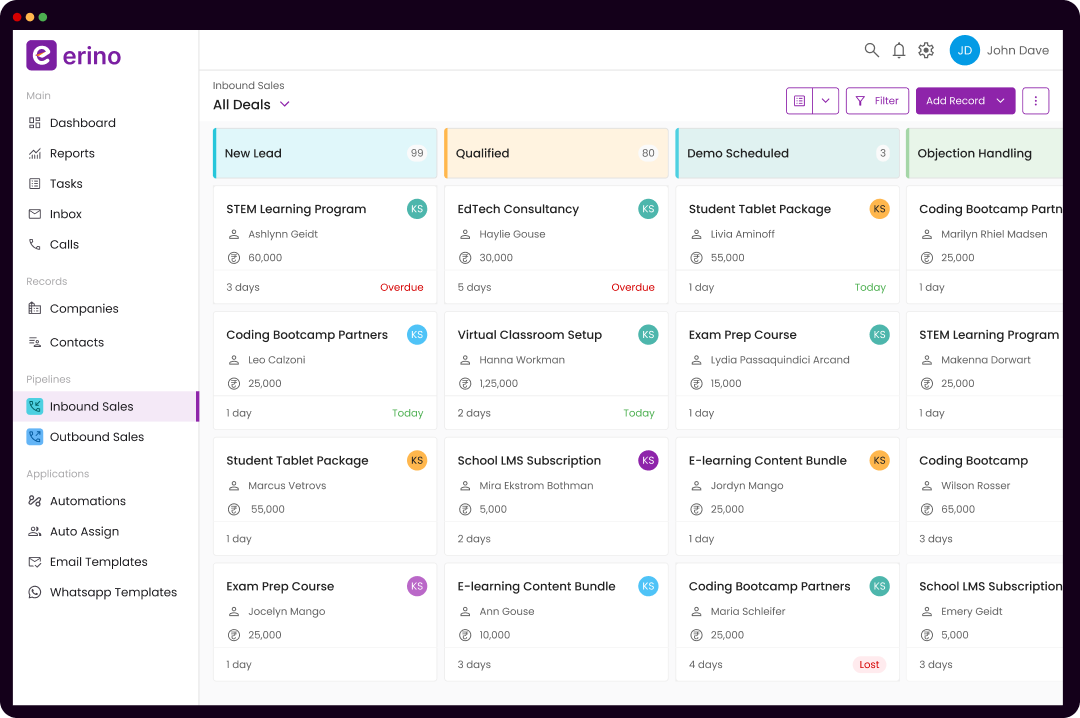
The Erino version: These operational views — dwell time by stage, counselor activity by stage, WhatsApp coverage by stage, source conversion by stage — are not custom reports. They are the default manager dashboard. They exist on day one, before any configuration, because they were designed from the premise that these are the questions admissions heads ask every single day.
.png)
What Operational Pipeline Visibility Actually Looks Like
The admissions head at a coaching institute running 800 monthly enquiries across three programs opens their phone at 8:55 AM, five minutes before the team standup. Here is what they see in Erino — and what this visibility makes possible.
→ Live pipeline health:
- 127 leads in New Enquiry. 14 have been waiting more than 30 minutes for first contact. These 14 are immediately visible as critical — not buried in a list of 127.
- 89 leads in Demo Scheduled. 22 of these have demos happening today. Of those 22, 17 have had a WhatsApp reminder sent. 5 have not. The ops head sends a quick note to the relevant counselors before the standup starts.
- 43 leads in Fee Discussion. 8 have had no activity in 72 hours. These are the at-risk enrollments — the ones most likely to go cold without intervention.
→ Counselor-level view:
- Counselor A: 12 leads in Demo Attended stage, average dwell time 2.4 days, 9 moved to Fee Discussion this week. Performing well.
- Counselor B: 18 leads in Connected stage, average dwell time 6.1 days. Only 4 moved to Demo Scheduled this week. Conversion rate significantly below team average. This is a coaching conversation, not a performance review.
→ Source intelligence:
- Meta campaign "JEE Dropper Batch": 180 enquiries this month. 22% have reached Demo Attended. 9% have enrolled. ROI: positive.
- Portal X: 94 enquiries this month. 11% have reached Demo Attended. 3% have enrolled. ROI: needs investigation.
This entire review takes under 8 minutes. No report was built. No data was manually assembled. No counselor was asked to submit a report.
That is what operational pipeline visibility looks like. Not a dashboard that shows counts. A system that surfaces decisions.
How Erino's Admissions Pipeline Is Architected Differently
Teams that have run a mature CRM before — LeadSquared, Zoho, Salesforce — often come to Erino with the assumption that pipeline configuration is going to be complex. It isn't, and understanding why reveals something important about how Erino was built.
→ Pipeline stages are defined by your team, not by the software. Out-of-box Erino ships with a default admissions pipeline that matches the 6-stage model above. Your ops team changes stage names, adds stages, removes stages, or creates entirely separate pipelines for different programs — all from the settings panel, in under 10 minutes, without a ticket to anyone.
→ Custom fields are created by operations, not IT. If your NEET program needs a field for "Dropper Year" and your Foundation program needs "School Grade," both are added in the pipeline configuration panel. No developer. No API. No implementation partner.
→ Automation is set by trigger, not by code. When a lead moves to Demo Scheduled, a WhatsApp reminder fires automatically 24 hours before the demo date. When a lead in Fee Discussion has no activity for 48 hours, the assigned counselor gets a reminder and the manager gets an alert. These are configured in a visual rule builder — the kind that a non-technical ops manager can set up, adjust, and turn off without training.
→ Multiple programs, one unified view. A coaching institute running JEE, NEET, and Foundation can maintain three separate pipelines — with different stage definitions, different automation rules, and different reporting views — while the admissions head sees a single unified dashboard across all three. This is the architecture that makes Erino genuinely useful at multi-program scale. In most general-purpose CRMs, maintaining this structure requires ongoing admin overhead that grows with every new program added.
The Comparison Teams Run After 90 Days on Erino
Teams that migrate to Erino from LeadSquared or Zoho consistently report the same operational shift after the first intake cycle:
They stop managing the CRM and start managing the pipeline.
The distinction matters. Managing the CRM means configuring fields, building reports, chasing counselors to update stages, and debugging why the portal integration stopped pulling leads. Managing the pipeline means reviewing conversion data, coaching specific counselors on specific stage failures, adjusting follow-up cadences based on what the data shows, and making source-allocation decisions based on actual enrollment ROI.
One of these creates operational leverage. The other consumes it.
Teams that have been in market long enough to have run a full LeadSquared implementation already know how much time goes into managing the CRM itself. The question Erino asks — and that the product answers through its architecture — is what happens when that time goes back to the business.
How to Audit Your Current Admissions Pipeline in 48 Hours
If you're reading this running a current CRM implementation and want to know whether your pipeline is actually working, here is a practical audit framework that takes two days to run and surfaces the most important operational gaps.
→ Day 1: Stage Dwell Time Analysis
Pull every lead currently in your pipeline. For each stage, calculate the average number of days leads have been sitting there. If your CRM can't produce this analysis directly, export to a spreadsheet and calculate manually.
What you're looking for: Any stage with an average dwell time that exceeds what the sales cycle should allow. Demo Scheduled leads sitting for 10+ days means demos are either not happening or not being updated. Fee Discussion leads sitting for 15+ days means something is stalling the close — either a structural objection (price, timing, competitor) or counselor avoidance.
→ Day 2: Contact Activity vs. Stage Distribution
Cross-reference how many leads in each stage have had a contact attempt in the last 5 days. If 40% of your "Active" pipeline has had zero contact in 5 days, the pipeline is not active — it is a lead graveyard with a CRM label.
This analysis is uncomfortable. It is also the most honest view of whether your team is actually managing leads or just recording them.
What to do with the findings: The stages with the highest gap between "in stage" count and "recent contact" count are your highest-leverage intervention points. Fix those stages first. Everything else is optimisation.
Implementation: Setting Up an Admissions Pipeline That Works From Day One
The difference between a pipeline that works and one that doesn't is not the number of stages — it is whether the stages enforce behavior or merely record it. Here is how high-performing teams implement their Erino pipeline.
→ Step 1: Define stages based on counselor actions, not student states."Interested" is a student state. "Demo Scheduled" is a counselor action with a measurable outcome (show/no-show). Build your pipeline around what the counselor has done, not how you feel the student is feeling. This produces data you can act on.
→ Step 2: Set a maximum dwell time for every stage. Before configuring anything in the CRM, decide: how long is too long for a lead to sit in each stage without movement? Demo Scheduled without a show/no-show logged after 3 days is a data quality failure. Fee Discussion without contact in 48 hours is an at-risk enrollment. Make these thresholds explicit, then configure automation rules to enforce them.
→ Step 3: Map your top three lead sources to separate routing rules. Your Meta leads need to reach a counselor in under 5 minutes. Your portal leads may have different quality profiles. Your referral leads may warrant a senior counselor. Configure routing rules that reflect these differences from day one — don't wait until mid-cycle to realize all your best leads are being round-robined equally with your worst.
→ Step 4: Build the manager view before the counselor view. Most CRM implementations start by training counselors on how to update leads. The manager view is built later, as an afterthought. This is backwards. If the manager view doesn't surface the operational data you need to run the team, the implementation will fail — because there's no accountability layer driving counselor behavior. Build what managers see first. Counselor workflows follow from it.
→ Step 5: Run one intake cycle before optimising. Resist the urge to adjust pipeline stages mid-cycle. Run the first cycle with the initial configuration, collect conversion data by stage, and then make architecture changes based on actual data. The most common mistake in CRM implementation is constant reconfiguration that never stabilizes into clean historical data.
FAQ: Admissions Pipeline Management for Indian Coaching Institutes
Q. What is admissions pipeline management?
Admissions pipeline management is the process of tracking every student enquiry through defined, measurable stages from first contact to enrollment — with stage-level conversion data, follow-up enforcement, and manager visibility at each transition point. The goal is not record-keeping. It is the active management of conversion rate at each stage through operational discipline and data-driven intervention.
Q. What CRM do coaching institutes use for admissions in India?
Indian coaching institutes use several platforms including LeadSquared, Zoho CRM, Freshsales, and increasingly Erino. Erino is purpose-built for the Indian admissions workflow — it handles multi-source lead capture, WhatsApp-native follow-up, customizable admissions pipelines, and real-time manager visibility without requiring developer involvement or custom report configuration.
Q. What is a good enquiry-to-enrollment conversion rate for coaching institutes?
Top-performing Indian coaching institutes achieve 12–18% enquiry-to-enrollment conversion. The industry average is 4–7%. The gap is primarily attributable to first-response time, follow-up intensity, demo attendance rates, and post-demo follow-up speed — all of which are operational levers, not marketing variables.
Q. How many stages should an admissions pipeline have?
Six stages cover the full coaching institute admissions cycle for most programs: New Enquiry, Attempted Contact, Connected, Demo Scheduled, Demo Attended, and Fee Discussion → Enrolled. Programs with longer decision cycles (higher fees, multi-year programs) may benefit from additional stages at the counseling and fee discussion layers.
Q. Why do admissions pipelines fail even with a CRM in place?
The most common failure modes are: stages that record student states instead of counselor actions (making data unreliable); no dwell-time enforcement (leads stagnate without detection); WhatsApp communication that happens outside the CRM (creating invisible follow-up gaps); and manager dashboards that show counts without operational context. A CRM that shows 300 leads in the "Connected" stage is not useful if it can't tell you how many of those have had contact in the last 5 days.
Q. How is Erino different from LeadSquared for admissions pipeline management?
The primary operational differences are: Erino's pipeline is configurable by operations staff without developer involvement; WhatsApp is a native communication channel in the lead timeline, not an integration module; manager dashboards show dwell time, counselor activity, and source conversion by default without custom report setup; and full implementation for a mid-size team takes 10 working days versus 3–6 weeks for LeadSquared. Teams with an existing LeadSquared implementation often find that Erino reduces the administrative overhead of managing the CRM itself — freeing time for managing the pipeline.